Frequently Asked Questions
I need coaxial cable or passive RF components?
We source reliable cable and components for resale to the public and trades. Please check here for general information, click here for product categories, or contact us using this form with your specific requirements.
Looking to Send a Signal?
Visit our home page, click the “Access Signals” button and then enter the Signal ID provided to you when you purchased your product! This will direct you to your Signal’s Tracker page, on which you can again click “Send a Signal” and fill out the Setup form.
What exactly happens when I submit a Signal for sending?
We run an automated transmitter, out of Melbourne, Australia. To find out more about the nuts & bolts, please click here. Or, to see the current status of the transmitter click here.
My Signal Codes are not working
If you are unable to access your Signal, or you believe you have faulty codes, please contact us by filling out the form here.
Where do I find the Signal Codes?
We do not sell individual Signal codes directly to the public. Codes are mostly used for STEM educational outreach. Some are also sold through select retailers to help support our educational programme.

Have additional enquiries?
Please leave us a message by clicking the button.
Sending: Step-by-Step
There are seven steps for sending a signal to space through our transmitter.
Step One – Access Your Setup & Tracker Page Visit our home page www.bluedome.au, click on the “Access Signals” button, enter the Signal ID code provided to you then click “Submit”. The Signal ID is the code provided to you, starting with a lower case “e”. You will be directed to your Signal’s Tracker page.
Step Three – Access the Signal Setup Form On the Signal Tracker page, consider bookmarking the page for fast future access. Check that you are on the page with the correct Signal ID, shown toward the bottom of each section, and then click the “Send a Signal” button to access the Signal Setup Form.
Step Four – Enter Your Signal Text On the Signal Setup Page, enter the words you wish to send into the solar system & beyond, plus click the box if you would like visitors to this website to see your words. Note that your text is transmitted in an encoded but unencrypted format hence it is inadvisable to include private, personally identifiable information such as full names, birth dates or addresses.
Step Five – Enter Name and Email If you wish to be emailed details about your signal’s transmission please enter a name and email address in the boxes provided. We also need an email address for passcode resets. Your email address will not be used for marketing purposes, or given to third parties unless compelled by law. A name and email address are both optional, or you can use a pseudonym if you prefer, but passcode resets will not be possible without a valid email address.
Step Six – Submit the Form and Await Transmission Enter the passcode supplied to you and complete the “I’m not a Robot Challenge” then hit the “Submit” button. If successful, you will be returned to your Signal Tracker Page and your signal will be included in the next scheduled transmission. Transmissions occur every hour, approximately on the hour, except at midday, when the sun interferes with transmission, or during periods of disruptive geomagnetic activity.
Step Seven – Follow Progress Check your emails, or return periodically to your Signal’s Tracker page to follow when your signal has been sent and when it reaches important milestones such as covering the distance to a specific planet, or eventually leaving the solar system. Your Signal is sent three times, at 24 hour intervals. This improves the chances of successful long-term signal propagation. But your signal cannot be changed after the first transmission.
If you have received or purchased an original Blue Dome Signal ID/Code and you’re unable to reach Step Seven, please fill out the form below telling us what went wrong.
Let`s connect
Contact Us
We`re here to assist with your RF requirements, resolve any issues or welcome your queries and suggestions.
Your message has been sent

Transmitter Nuts & Bolts


Our transmissions are covered under the Australian Government-regulated ACMA Radiocommunications (Science & Research) Class license.
Under our licensing, we transmit on frequency 493.5 MHz with a maximum necessary bandwidth of 16 kHz, for the purpose of furthering scientific education and research. Maximum power is stipulated 83 W effective isotropic radiated mean power, although we cap our transmissions at 7 dBm, which is substantially below the required maximum. The transmitter is located at latitude -37.82 longitude 145.03, Melbourne, Australia.
Software-defined radio (SDR) is a radio communication system where components traditionally implemented in analog hardware, such as mixers, filters, and modulators, are instead implemented using software on a personal computer or embedded system.
https://en.wikipedia.org/wiki/Software-defined_radio
Signal processing, from the words entered on our Setup form to propagation into the atmosphere and then outer space, is achieved with software defined radio, specifically the GNU Radio software combined with python-coded bespoke processing modules.
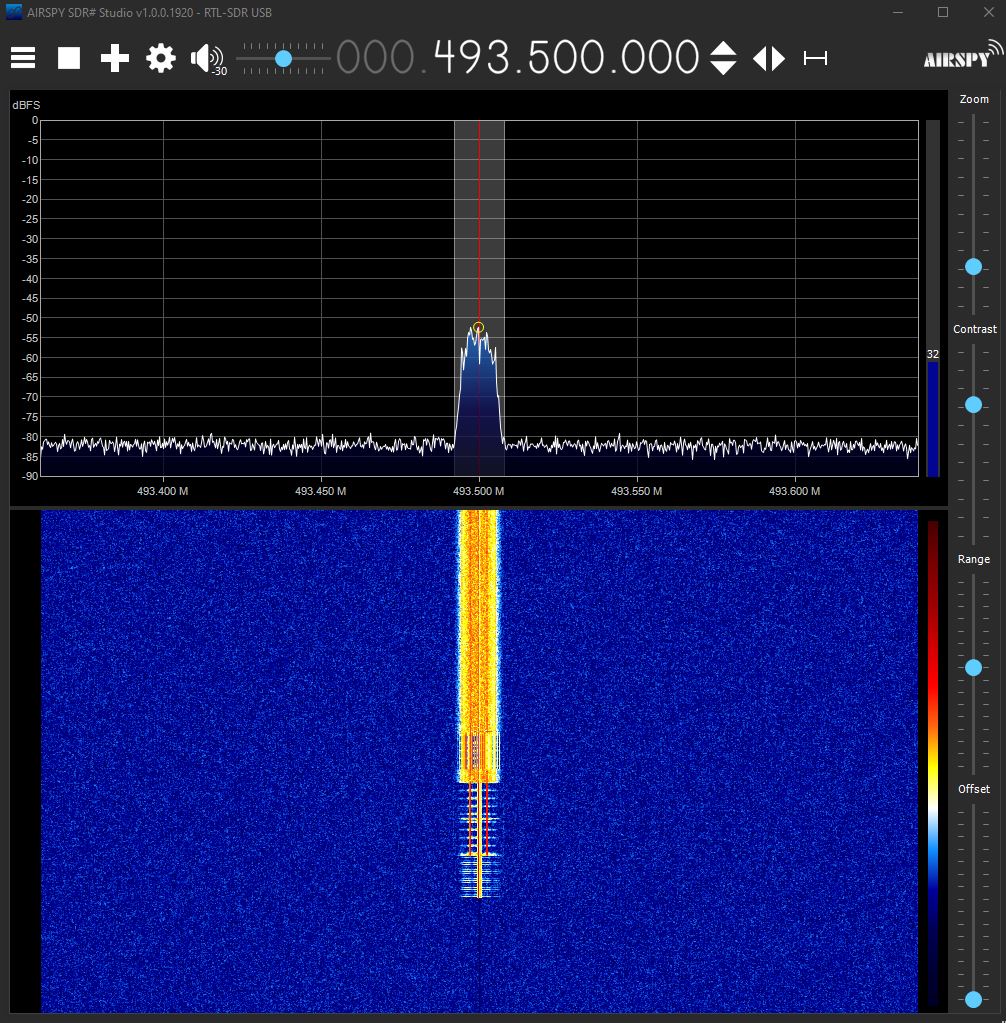
Confirmation of successful transmission is carried out periodically (at least once every 24 hours) by monitoring the transmission frequency using a separate antenna and receiver, located a small distance from the transmitter. The resulting waterfall and power spectrum is checked for the following features:
- Power Level: To ensure compliance with license specification and to monitor for erroneous signal attenuation within the transmission system.
- Bandwidth: To ensure no leakage outside 16 kHz including during calibration events at the start of each transmission, when there is a heightened risk of splutter.
- Pattern & Duration: The system bandwidth enables transmission of a specific number of characters per minute. Transmission durations which are significantly at odds with the expected duration generally indicate problems. Moreover, each transmission has a calibration phase, which produces a characteristic waterfall plot, shown in the above picture (in yellow, lower half of the plot).
Building at scale
The current hardware setup is low in power and directional efficiency. We are currently seeking a tertiary institution to host our facility in a way that can handle more information throughput, higher signal strengths and better directional focus.
Your patronage of our current service massively assists with our future expansion plans to better facilitate science education and give more people the opportunity to interact with, and understand, our big, beautiful universe without interfering with commercial or military applications.
Additional Information
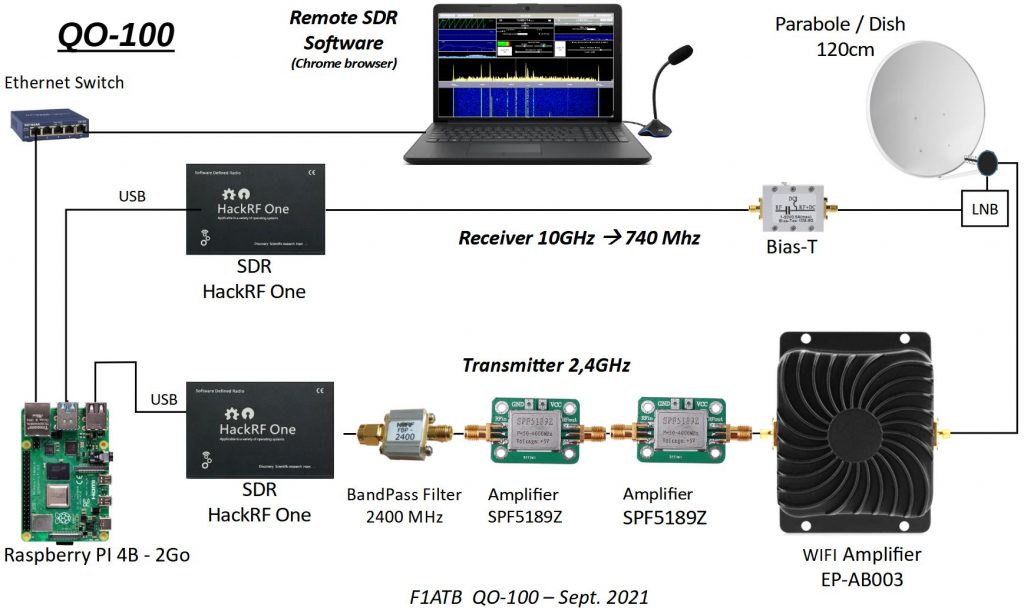
Excellent diagrams and descriptions of the type of setup we use are available on the website accessible here, or a brief video presentation can be viewed below.